Installing Sage 300 modules
Step 1. Installation Steps
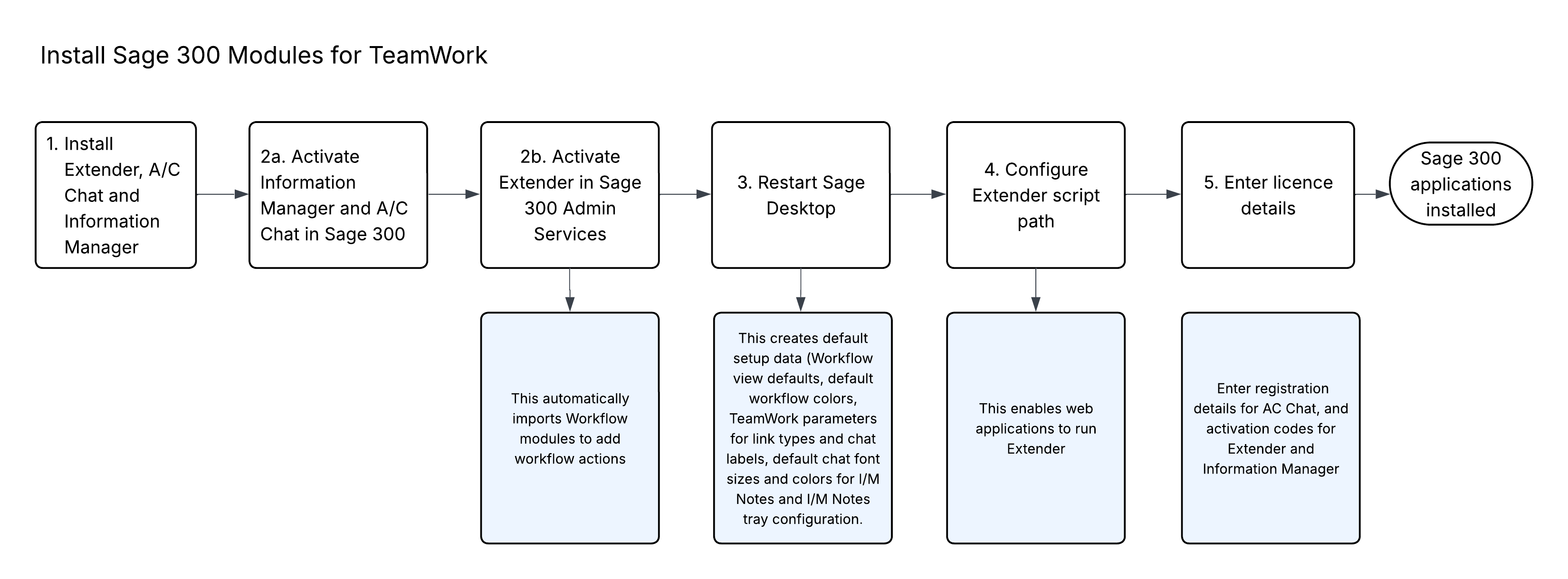
A/C Chat, Extender and Information Manager are installed by executing the EXE program downloaded for installation.
Step 2. Activate Modules
-
Activate A/C Chat and Information Manager in Sage 300 Administrative Services > Data Activation.
-
Activate Extender (in a separate step)
Step 3. Restart the Sage desktop
This step runs the Workflow activation script and creates default setup data (Workflow view defaults, default workflow colors and other default parameters).
Step 4. Configure Extender script path
As TeamWork uses IIS, you need to ensure that the IIS user can run scripts.
In the Registry Editor, add a new Key called Extender and a new StringValue called ScriptPath in the Extender key.
-
You can use either LOCAL_MACHINE or CURRENT_USER - Extender will first check for CURRENT_USER and only use LOCAL_MACHINE if CURRENT_USER is not set.
-
Set CURRENT_USER if you want the setting to only apply to the current Windows user.
-
Set LOCAL_MACHINE if you want the setting to apply to ALL users.
-
-
Set the value to a path that all users have write access to.
For details, see Configuring the Python Path for Script Execution
Step 5. Enter activation codes
Enter registration details for AC Chat
Refer to AutoSimply documentation for details.
Enter activation codes for Extender and Information Manager.
To start using Extender, you need a valid serial number and license file.
If you don't have a valid license for Extender, you only see the License screen.
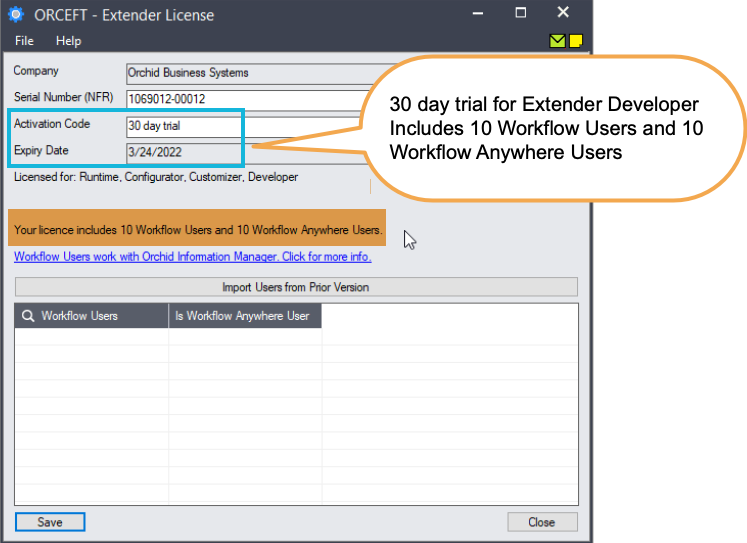
Enter License Details
The installation doesn't require a serial number. You enter the serial number and activation code in the License screen.
Note: The license applies to all the Sage 300 databases for the same installation. You only need to enter the license details in one company.
There are two options to enter the license details:
 Use a 30 day trial license file
To generate a 30-day trial license file, enter the serial number provided for your module and Save the details.
Tip: If installing with a 30 day grace period, additional re-installations will not extend the grace period.
After Purchasing a subscription or a perpetual license
If you have purchased the module, enter the serial number and activation code provided by your Sage 300 business partner.
Tip: If installing with a 30 day grace period, additional re-installations will not extend the grace period.
Minimum Requirements
You need to use the same version for the core Sage 300 modules and Extender. For example, Extender version 2026 requires Sage 300 System Manager version 2026.
Additional specific Sage 300 modules may be required to enable all functionality. Refer to Orchid Systems's website for details ( https://www.orchid.systems).
For Orchid End-User License & Service Agreement, refer to Orchid EULA