Using EFT Overview
When you have configured EFT File formats, EFT Processing Banks, AP Vendors, AR Customers and / or Employees, you are ready to start generating EFT files.
An EFT file is a structured file containing payment or debit instructions formatted according to your bank’s requirements for the type of transactions you want to send to the bank. For example, it can be a CSV file or an XML file.
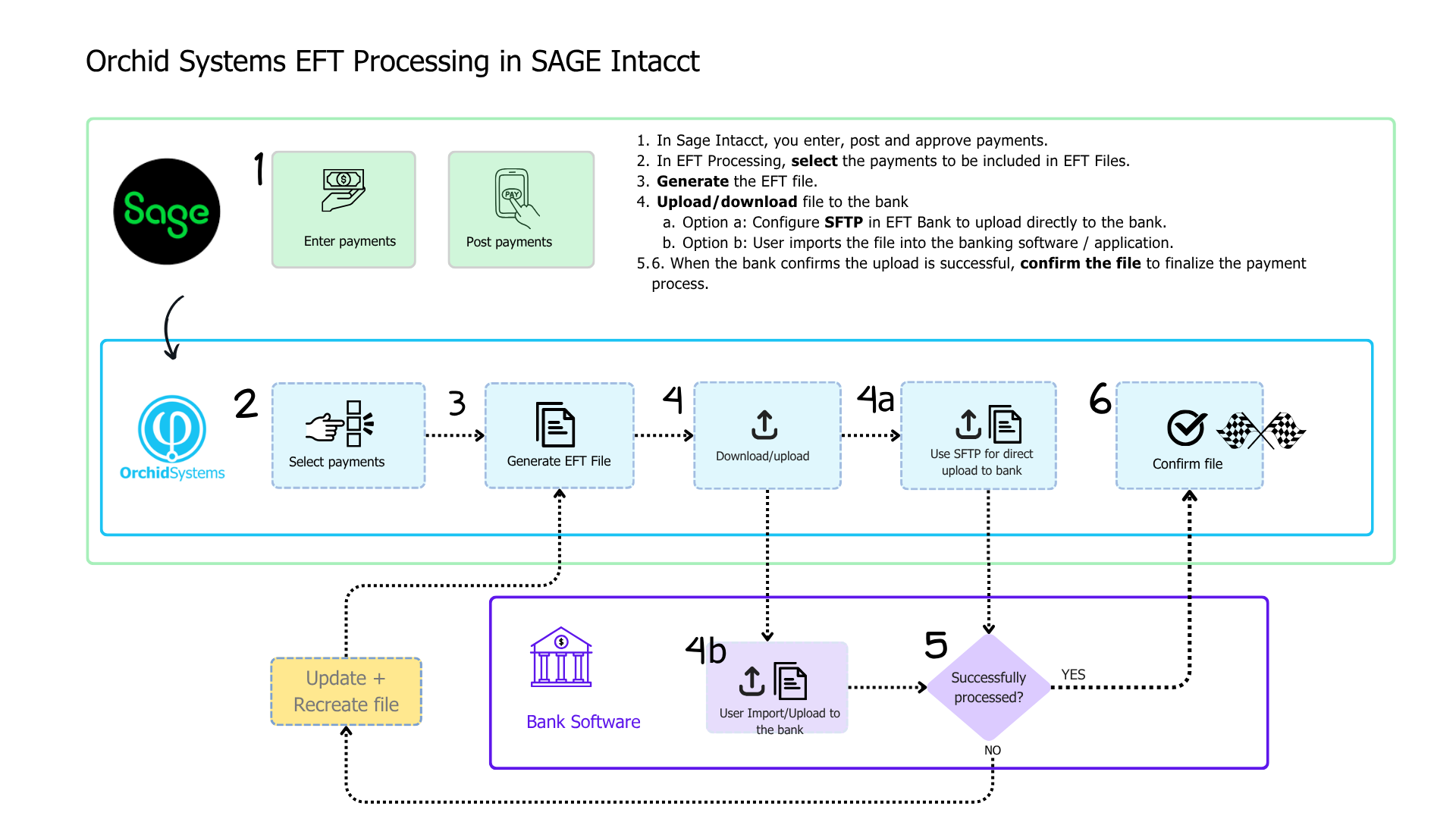
How does EFT Processing work?
Users create payment or receipt transactions, approve and complete them in Sage Intacct, using Sage Intacct standard processes. There are no specific approvals for Orchid's EFT files.
Users can then select payments to include in the payment run and generate an EFT file.
There are two ways to send the file to the bank:
-
You can download the EFT File and log into the bank portal to upload the file to the bank's application.
-
If using the SFTP option, you can upload it directly to the bank's SFTP site. Depending on the bank, you may have to log on to the bank for a final approval, but you don't need to log into the bank to upload the file.
Detailed Steps
Detailed steps are described for vendor payments, employee expenses reimbursements and customer direct debits :
The process is described in the flowchart below:
For more details, view the topics below: