Client's bank details
The bank provides many of the client's details required in the EFT File, besides the account number and the file specifications.
The number of fields and type of information depend on the format. It is important to discuss this with your bank at the start of the EFT Processing implementation project.
Financial Institution ID, Originator ID or SEPA company id, intermediary bank for international wires.
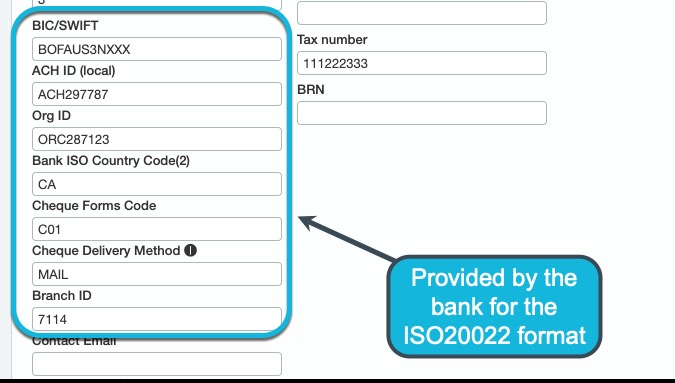
Additional information for ISO20022 formats:
Processing Options
You may discuss processing options with the bank to support your specific payment processes. This may require some adjustments to the format.
-
Do you use the payment date as the payment date for each transaction in the file?
-
Do you send files to the bank in advance? Do you need to set an effective payment date in the file for all transactions in the file?
-
Do you do cross border payments? What countries? What currencies?
-
Will you be generating pre-notes to validate the details of new vendors/customers or for large amounts?
-
Are there multiple EFT File Formats required for an individual bank account (e.g. Positive Pay, Domestic Payments, Wire Payments and/or International Transfers)?
-
If there are multiple formats, does the bank accept the different formats in a single file (e.g. standard and fast payments in the same file)?
Uploading the file to the bank
Users can download the EFT file in their browser and upload it through the banking software.
While this is the most common option, increasingly banks offer end-to-end transmissions (also referred to as host-to-host connectivity). EFT Processing offers an option to upload the file directly to a SFTP server.
You can discuss the best option with your banks.
Some banks have specific requirements about the file naming and the transmission methods. Here are some example questions
-
What are the bank's requirements regarding file name and file extension?
-
Does the bank require a File Sequence Number which increases each time the file is uploaded?
-
Does the bank require a sequence number which increases by 1 for every file uploaded in a day and is reset to 1 the next day?
-
Does your bank support secure file transfers via SFTP?
-
If SFTP is supported, has the bank provided the required connection details and file transmission specifications?
Adding the formats and bank details in Sage Intacct
After installing EFT Processing, you can add the format and the bank details in Sage Intacct.