EFT Custom Objects
When you import the Orchid EFT XML customization package in a Sage Intacct company, the import creates custom tables, menu items, custom screens and adds user-defined fields to AP Vendor, AR Customer and Time and Expenses Employees.
Bank details for vendors, customers, and employees are stored directly within Sage Intacct using the Orchid EFT fields. They are not hosted on a separate server.
Important! Available features in the EFT Processing application depend on your License code.
The following objects are created:
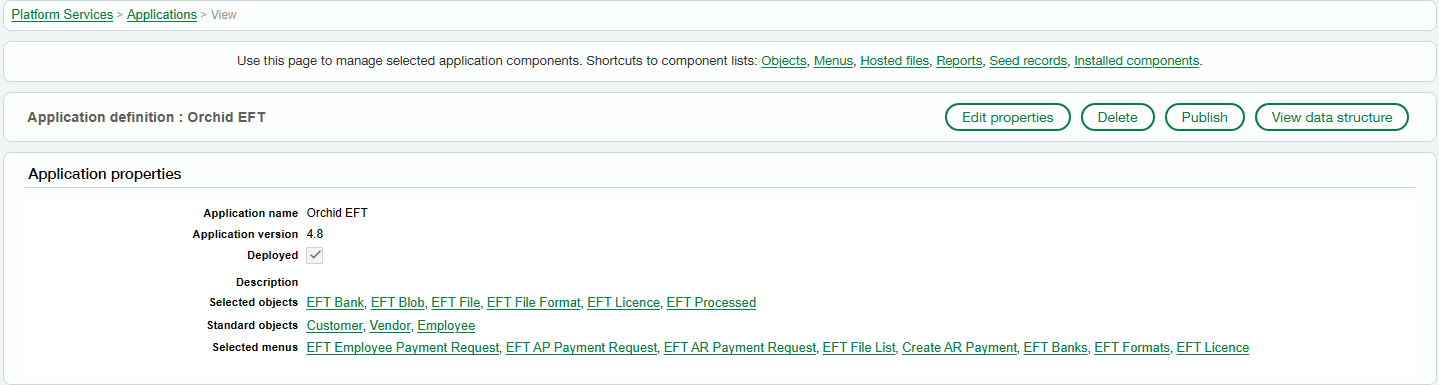
Tables
-
EFT Bank
-
EFT Blob
-
EFT File
-
EFT File Format
-
EFT Licence
-
EFT Processed
-
EFT Permissions
Menus Items and custom screens
-
EFT Employee Payment Requests
-
EFT AP Payment Requests
-
EFT AR Payment Requests
-
EFT File List
-
Create AR Payment
-
EFT Licence
-
EFT Permissions
User-Defined Fields (19 on each of AP Vendor, AR Customer and T&E Employee)
-
: Account Name, Account Number, Bank Name, BIC, Bank/Branch, Extra, Extra 1, Extra 10, Extra 2, Extra 3, Extra 4, Extra 5, Extra 6, Extra , Extra 8, Extra 9, IBAN, Payment Reference, EFT File Format
-
: Account Name, Account Number, Bank Name, BIC, Bank/Branch, Extra, Extra 1, Extra 10, Extra 2, Extra 3, Extra 4, Extra 5, Extra 6, Extra , Extra 8, Extra 9, IBAN, Payment Reference, EFT File Format
-
: Account Name, Account Number, Bank Name, BIC, Bank/Branch, Extra, Extra 1, Extra 10, Extra 2, Extra 3, Extra 4, Extra 5, Extra 6, Extra , Extra 8, Extra 9, IBAN, Payment Reference, EFT File Format

Custom Reports
Orchid's EFT Processing (Sage Intacct) does not include any pre-defined reports. However, all custom objects are available for the custom report writer.
Orchid's EFT Processing for Sage Intacct includes a number of inquiry screens, with filters to select and review the required data:
-
Payments included in an EFT File,
-
Payments not included in an EFT File,
-
EFT files Created