For an overview, refer to Bin Inventory Counts
 Fields and Controls
Bin
Fields and Controls
Bin
Enter the bin number
Item
Enter the Item Number
Description
The I/C Item description is displayed
Quantity Counted
Enter the physical quantity that has been counted.
If you enter a quantity for a serialized or lotted item click the Zoom (^) button in the Quantity Counted column.
Note:
-
If B/T worksheet is created by I/C generate worksheet then the details for Serialized/Lot quantities is entered as a variance.

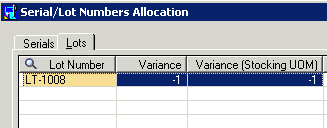
-
If B/T worksheet is created by B/T generate worksheet then the details for Serialized/Lot quantities is entered as a quantity counted.


Stocking Unit of Measure
The stocking unit of measure for this item is displayed
Counted by
Displays the user name.
Status
Status can be:
- Insufficient Quantity
- On Hold
- Ready
- Pending (Pending is when it can't update this item because another line with the same item is Insufficient Quantity)
Reason
The reason is used when the status is Insufficient Quantity and can be:
- Lot %p has a variance of %b but there is only %b available.
- Item has a total variance of %b but there is only %b available.
- Item has a variance of %b but there is only %b available.
It basically says which item/lot has the problem and what the problem is.